
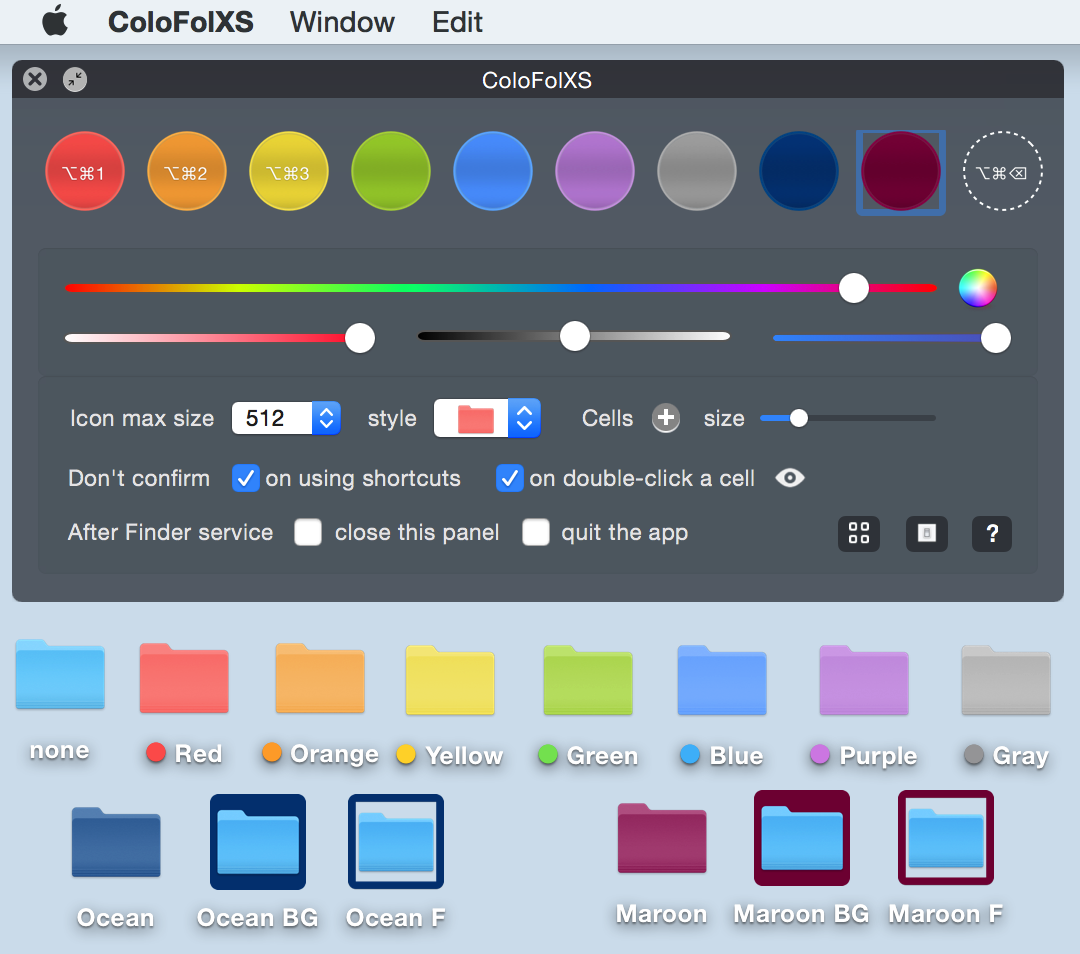
 Basic steps are very simple:
1. Launch ColoFolXS.
2. Drag & drop a folder to a color cell.
Or use as a Finder service:
1. Right- (or ctrl-) click a folder in the Finder.
2. Select "ColoFolXS" from the contextual menu.
3. Click a color cell. Note: to change the same folder's color again, these 3 steps must be repeated.
Main Features:
- Cell colors are adjustable with the color sliders or using the color panel.
- Possible to keep not only colors but also your favorite folder icons on the main panel (drop an icon image to the empty cell while pressing the alt (option ⌥)-key).
- Custom icon max size can be limited to reduce memory use.
- Finder tags can be linked to the ColoFolXS colors, so that they are added or removed when you change icons with ColoFolXS.
- Possible to list the items marked with ColoFolXS.
- Shortcuts can be assigned to the removal function and each ColoFolXS color (Note: they work while ColoFolXS is running, while the shortcut assigned to the Finder service works to launch the app).
For more details, please click the '?' buttons in the app.
Main changes in v.2.2.2:
- Support for Path Finder Setapp version (in addition to the standard version).
Note: if shortcuts stop working after PF version change, please refer "What's New and History" in the downloaded dmg. - Minor internal adjustments.
Note: the app works on macOS 14 (beta2), though it still needs a workaround of stimulating the Finder (cf. Notes below).
∙ on macOS 13 icon change may not be visible immediately if folders already have custom icons. Please stimulate the Finder (e.g. open folders) or remove existing custom icons before adding new ones. If you like to let ColoFolXS do a quick open-close workaround, select the new option on the setting panel.
∙ if a blank icon appears after removing color from a volume using a hot-key, hit the same hot-key again (or drag & drop the volume onto the empty circle) to regain a default icon.
∙ If ColoFolX (MAS version) is installed legitimately, ColoFolXS (v.1.4.1-) works fully. ColoFolX is, once purchased, still downloadable from the Mac App Store’s "Purchased" section (it is no longer available there after having been rejected due to its black main panel). If you need a ColoFolXS code, please email Trollin a copy of the iTunes Store receipt for ColoFolX using the same email address mentioned there.
∙ Unfortunately custom icons are not visible on the sidebar. XtraFinder and "mySIMBL" + its plugin "colorfulSidebar" might be interesting, if you are looking for tools to bring color to the sidebar icons and like to try at your own risk.

(Release on Mac App Store should follow after review.) Easy-to-use custom icon tool to combine and attach images to desktop items.
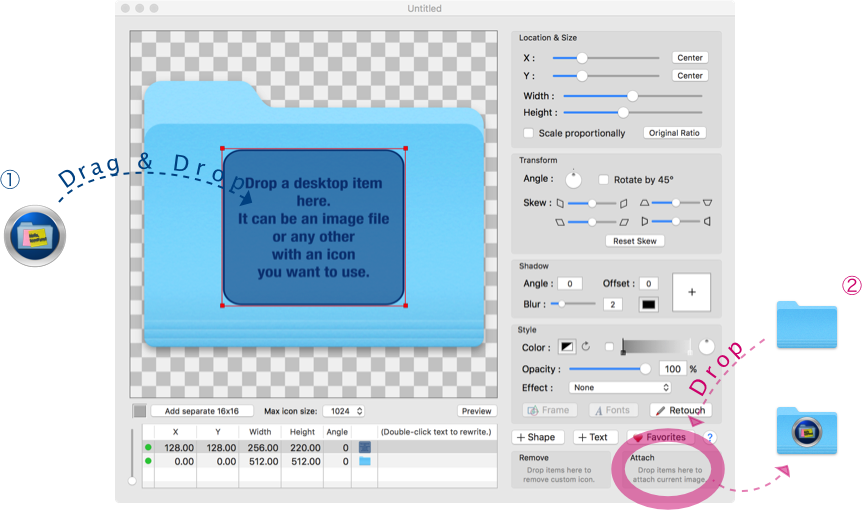
iconStiX is a custom icon tool to combine images, shapes & text and attach the composition to desktop items such as folder.
You can use the app normally or as Finder's services.
Main Features:
- multiple objects (image, shape and text) can be added and ordered in a list
- edit the objects in various way (move, resize, rotate, skew, color, shadow, change font)
- a retouch tool (overdraw or erase specified color)
- preview of scaled images
- attach / remove custom icons (read/write permission is required)
- possible to change the max icon size to reduce memory use (refrain from high quality)
- saving own documents to be used as template (QuickLook compatible)
- export as image (icns, png, tiff)
- a separate panel to keep favorite icons
- Finder services: copy, attach, remove, and open (more info)
Main changes in v.4.3:
- Text can be edited directly in the preview area by double-clicking a selected text object (as well as in the objects table as before).
- While text objects are selected but not edited, the contextual menu contains "add as image object" as well as alignment, line-spacing and writing direction.
- Bug fixing and internal adjustments.
∙ iconStiX v.3.8- can open documents saved in the earlier versions but now documents are saved in the new format (.istxd instead of .istx) to let thumbnails visible in the Finder.
∙ If a custom icon cannot be attached to a disk image volume, make sure enough memory is left in the volume.
∙ Custom icon cannot be added to the start-up volume directly; please try after restarting from any other volume.
 |
Macdownload.informer Editor's Pick Award The site provides several screenshots and a video tutorial. |

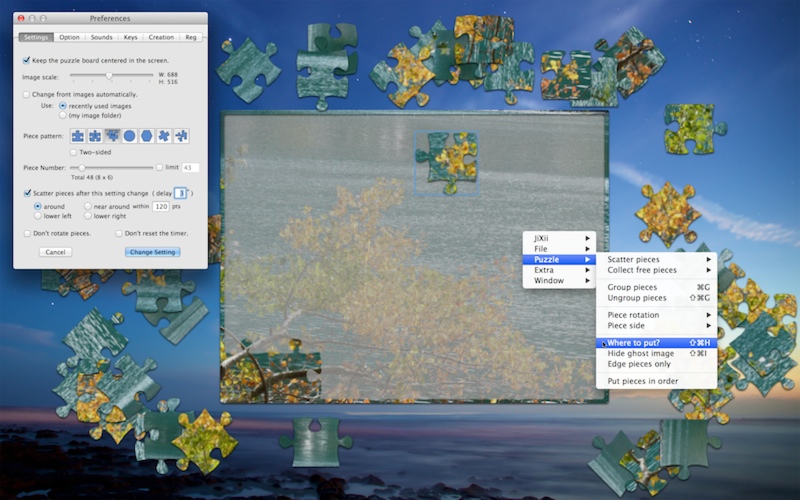
You can adjust various puzzle settings (image size, piece patterns and numbers, single or two-sided), view options (board color, piece outline, etc.), sounds and shortcut key assignment.
To change image, drop your image (e.g. your digital photo such as you see here ) on the program icon or on the puzzle board if JiXii is already open.
Your puzzles can be saved as "JiXii Cards" (.jixi) with your message and specific settings separately from the main puzzle.
Main changes in v.3.9:
- Hold the shift-key down and double-click an empty piece area on the board to find the piece to be there (the piece will be marked with a red circle).
- A new menu item "to be visible" under "Place free pieces" (previous "Collect free pieces") to make sure pieces are in the visible area.
- Two options "Scatter images after opening" and "Change image automatically" are added under the menu to distinguish from the similar options in the puzzle settings.
- a menu item "Place the board in the center" is added (replaced the previous option "keep the puzzle board centered").
- Double-click anywhere neither the board nor any piece exists to resign JiXii (the background becomes transparent, while the puzzle is still visible).
- Main puzzle states are saved separately in the Application Support folder (instead of including in the preferences file).
- On macOS 14 "Game Mode" turns on automatically when a game app launches and a notification appears.
The mode is generally effective in fullscreen mode, though it may have little impact on JiXii.
You can turn it off/on by clicking the game controller icon in the menu bar (or just ignore). - Bug-fixing and various internal adjustments.
∙ Due to data format changes in v.3.5 and 3.6, please avoid using earlier versions in mixture. Puzzles saved in v.3.5 can be read in the current version, but not vice versa.
∙ Saving as java applets (.jar) is no longer supported because they do not work not only in the web but also locally as stand-alone apps without code-signing.